
Authenticating your domain in Sendora
Step-by-step guide to adding DNS records (TXT, DKIM, DMARC) at your host and verifying authentication from Sendora.
Without authentication, your emails are sent from Sendora's default address (something like contact@send1.sendora.fr) instead of your own address, which can affect deliverability and your recipients' trust.
Verified address and authenticated domain: what is the difference?
Verified sender
Sendora confirmed that you control the email address, usually through a link received in that inbox. You can select it as a sender, but this does not yet authorize Sendora to send technically on behalf of its domain.
Authenticated domain
TXT, DKIM, and DMARC DNS records show mailbox providers that Sendora is authorized to send for your domain. This improves message identification and deliverability.
An address can therefore show Verified while displaying Authenticated: No. This is not a contradiction: you control the address, but its domain has not authorized Sendora to use it directly for sending.
Why can't Gmail, Outlook, or Yahoo be authenticated?
You do not control the DNS for public domains such as gmail.com, outlook.com, hotmail.com, or yahoo.com. Only the companies that own them can change their records, so Sendora cannot authenticate them for your account.
You can verify such an address, but Sendora sends technically from a Sendora address such as contact@send1.sendora.fr. Your identity remains associated with the message and replies can go to your address, but the technical From address is not your Gmail or Outlook address.
To send directly from an address such as contact@yourcompany.com, you must own yourcompany.com, have access to its DNS, and authenticate it in the Domains tab.
Why authenticate your domain?
- Your emails are sent from your own address, not from a Sendora subdomain
- DKIM and DMARC records are configured, which improves your deliverability
- You meet Google and Yahoo's 2024 requirements for bulk senders
- Your sender reputation is tied to your own domain, not Sendora's
- You can send from any address on your domain
Before you start:
- Your domain must be added in Sendora, under Senders > Domains
- You need access to your host's DNS management (OVH, Gandi, Cloudflare...)
1 Open the authentication page
From your Sendora dashboard, go to Senders then click the Domains tab. To the right of the relevant domain, click Authenticate.
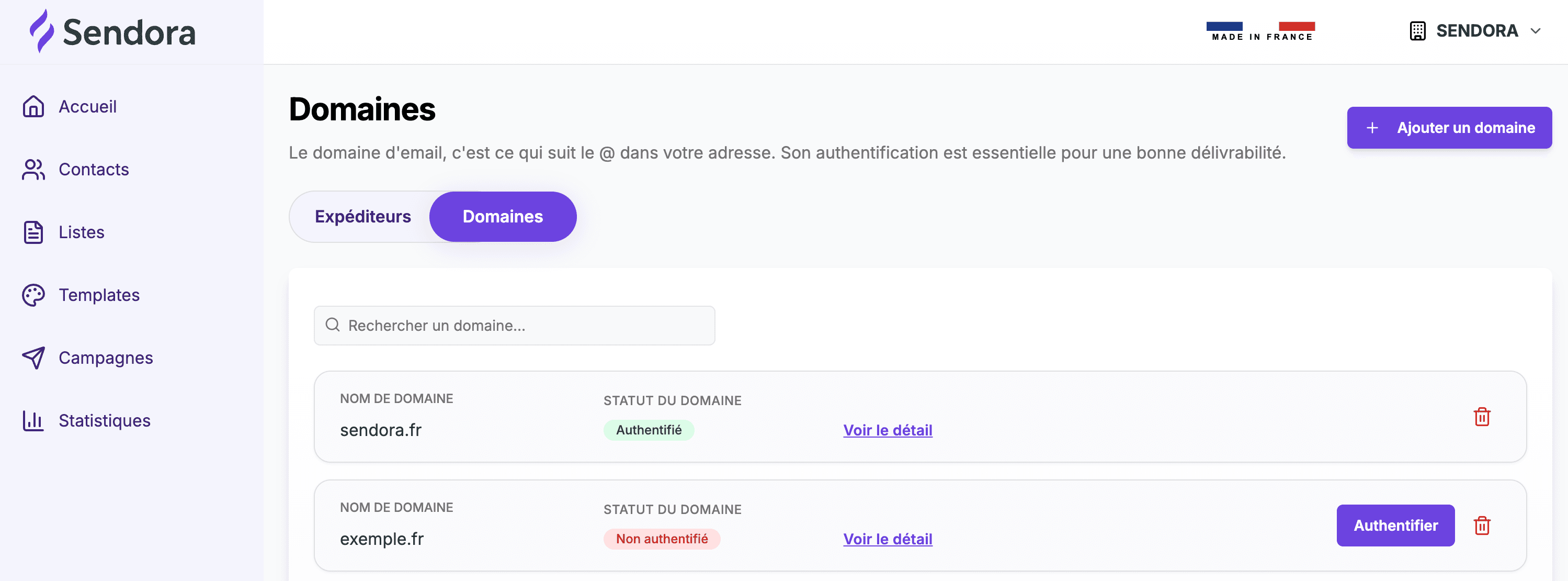
If your domain isn't in the list yet, add it first using the Add a domain button in the top right.
2 Get the DNS records
The page displays 5 records to copy and paste with your host. Use the Copy button to the right of each value.
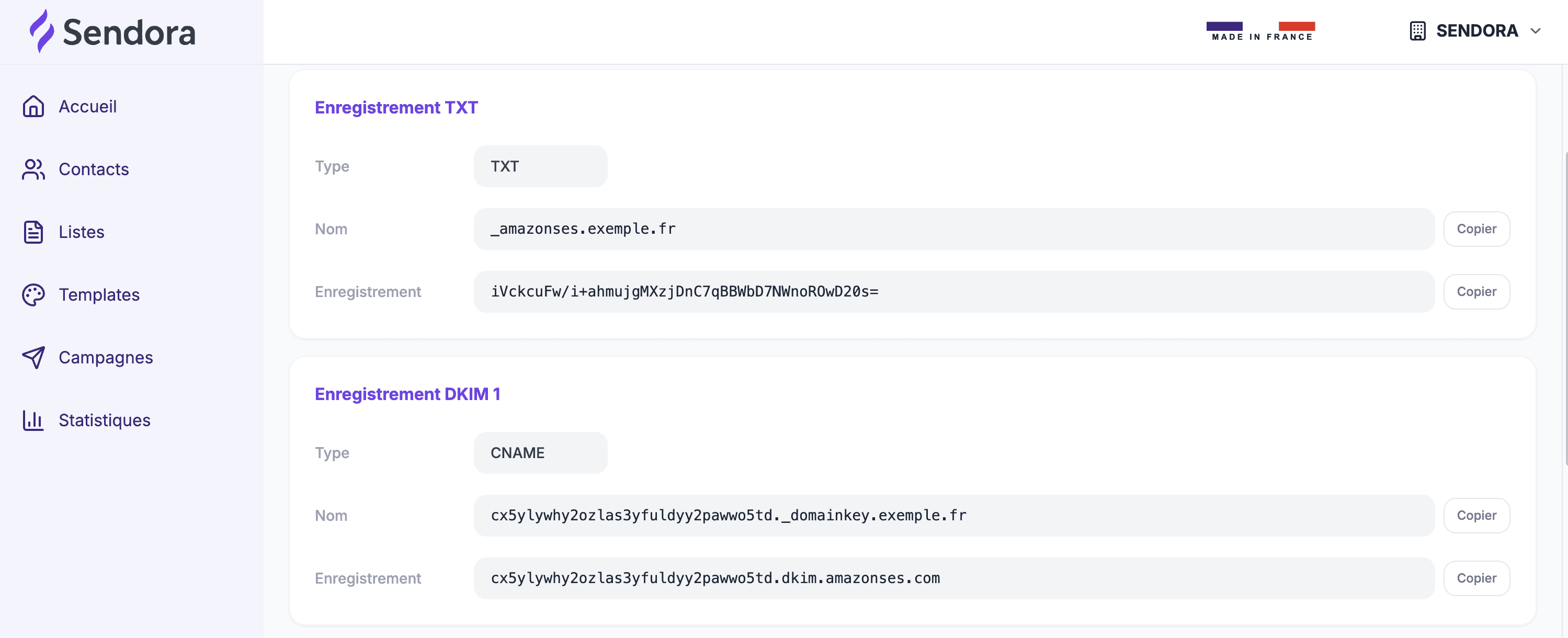
The 5 records explained
Domain ownership verification (TXT)
Proves that you actually own the domain. Required by Amazon SES, the sending infrastructure used by Sendora.
DKIM signature for your emails (CNAME x3)
Three CNAME records that sign every email sent from your domain.
Anti-impersonation DMARC policy (TXT)
Defines what to do if an email fails DKIM or SPF verification.
3 Add the records with your host
Log in to your host's management area and open the DNS Zone or DNS Management section. For each record, enter the Type, Name, and Value copied from Sendora. For the TTL, leave the default value.
Some hosts (OVH, Gandi…) automatically append your domain to the end of the Name field. If Sendora shows _amazonses.yourdomain.com, enter only _amazonses in the Name field.
Instructions by host
Click your host to access its official guide:
Can't find your host in the list? Look for "DNS Zone" or "DNS Management" in its interface, or contact its support team and ask how to add TXT and CNAME records.
4 Verify the configuration in Sendora
Once the records are added, go back to the Sendora authentication page and click Verify DNS. Sendora checks each record in real time.
- Verified ●: the record is correctly detected
- Not verified ●: the record is missing or contains an error
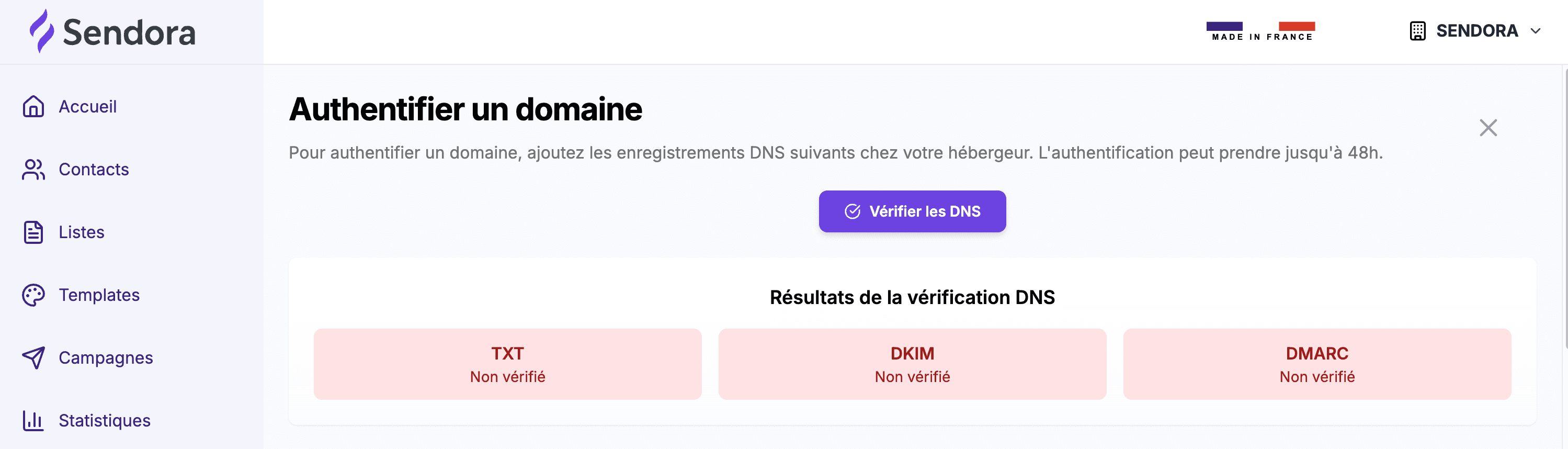
DNS propagation can take anywhere from a few minutes to 48 hours depending on your host. If the check fails right after adding the records, wait and run the verification again later.
Frequently asked questions
The check fails right after I add the records. Is that normal?
Yes, that's completely normal. DNS propagation can take up to 48 hours. Come back and run the check again in a few hours. If it still doesn't pass after 48 hours, check that the values were copied without extra spaces or quotation marks.
My host automatically appends my domain to the end of the Name field.
That's the behavior of some hosts (OVH, Gandi...). If Sendora shows _amazonses.yourdomain.com, enter only _amazonses in the Name field. Your host will automatically append the rest.
I already have a DMARC record on my domain.
You can only have one DMARC record per domain. Edit the existing _dmarc record instead of adding a new one, replacing its value with the one provided by Sendora.
Is my domain authenticated if only DKIM is verified?
DKIM is the most important record for deliverability. If DKIM is verified, your emails are signed and recognized by Gmail, Outlook, and Yahoo. TXT is required by our sending infrastructure, and DMARC protects your domain against impersonation. All three are needed for full authentication.
Can I authenticate the same domain on multiple sending platforms?
Yes. Sendora's authentication doesn't conflict with other tools. Each platform generates its own DKIM records with different names, and several can coexist in your DNS zone without issue.